
On 10 November 2026, I gave a 30-minute workshop for faculty on Codex, the coding agent from OpenAI. I opened with one request. Think of one task you repeat every week, in teaching, research or administration. Near the end, participants turned that task into a short brief for Codex. My question for the session was simple. Which routine task could Codex do for you, in a way you can still check? This post follows the workshop from start to finish, and the slides and a one-page guide are at the end.
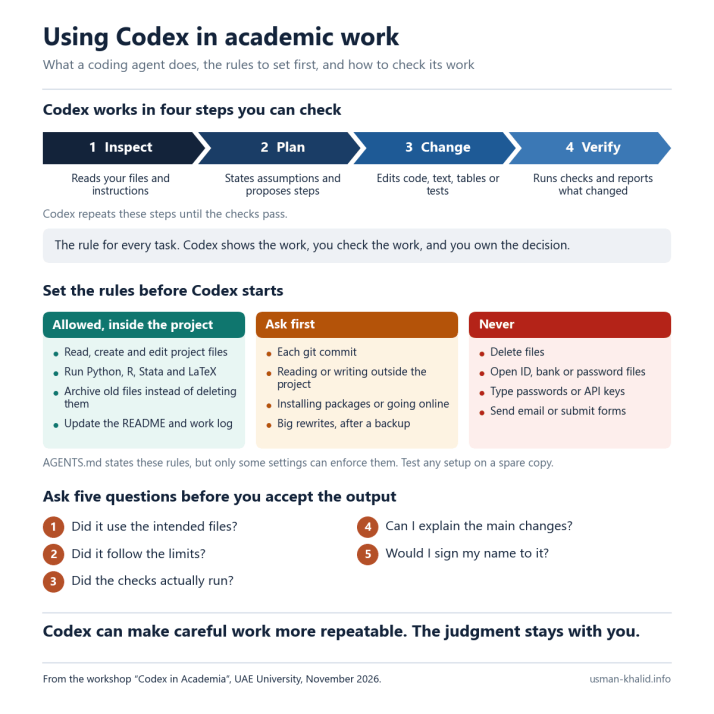
Codex Works in Four Steps You Can Check
Most of us use ChatGPT as a chat that gives us text. Codex works differently. It reads the files in a folder you choose, proposes a plan, changes the files, and runs tests or commands when you allow it. It then reports what it changed and repeats these steps until the checks pass.
The rule I used throughout the workshop was “Show the work, check the work, and own the decision.” Showing the work means that Codex shows its plan, the files it changed and the test results. Checking the work means that you test and review the result, rather than trusting it because it runs. Owning the decision means that you decide whether to accept the result, and you are responsible for it.
Codex can run on your own computer, in the ChatGPT desktop app, in an extension for code editors such as VS Code, or in a terminal as the Codex CLI. OpenAI calls this Codex Local. Codex Cloud runs tasks on computers managed by OpenAI. You can start a cloud task from any device, it works from a GitHub repository, and it keeps going while your laptop sleeps. Either way, what Codex reads is sent to OpenAI’s models, which plan and write the changes.
Use Codex for Code and Data, and Work for Documents
ChatGPT now has three modes. Chat is for quick help, such as questions, searches and brainstorming. Work is an agent for longer research and for finished documents, spreadsheets, presentations and reports, and it needs an eligible paid plan. Codex is for technical work, such as writing or debugging code, running tests and commands, reviewing changes and working with a repository. A simple rule follows. If the task ends in a report, try Work. If it ends in a script, a clean dataset or a tested project, use Codex. OpenAI has said that the agent features of Work are becoming part of the main ChatGPT experience, so the names may change, but the rule still applies.
Good Tasks Have a Finish Line You Can Check
Good tasks for Codex have four signs. They start from files, such as code, data, a template, a rubric or a folder. They follow steps you can explain and repeat. They end in something concrete, such as a script, a table, a figure, a report or a prototype. Finally, you can check the result with tests, totals, a list of changes or your own review. If one of these signs is missing, another tool may fit better, and open writing and brainstorming usually fit Chat or Work. If you cannot say how you will check the result, the task is not ready.
Your Account Decides the Data Terms
Before you try a task, check which account you are using. Every ChatGPT plan includes Codex, although the Free and Go plans have no cloud tasks. On Edu, Business and Enterprise workspaces, OpenAI does not train its models on your inputs or outputs by default, and administrators can allow local and cloud use separately. On personal Plus and Pro plans, chats may be used to improve the models unless you turn this off in the data controls. For university work, use the account your university approves, check its data controls and follow its policy.
In Teaching, Use Codex to Make Practice Tasks
The best use of Codex in teaching is not to give students answers. It is to make practice material. The first example is an exercise kit, with a starter folder, a small dataset and tests that catch common errors. The second is a debugging task, a broken script that students must explain before they fix it. The third is a set of feedback checks, the same checks run on every anonymized submission. Two rules apply here. Run checks only on anonymized work in an approved workspace, and decide every grade yourself. A useful question to ask first is what evidence a student should produce to show understanding.
It helps to brief Codex the way you would brief a teaching assistant. The brief I showed in the workshop had five parts.
Context. I teach an introductory data-analysis course.
Task. Build a short Python exercise from this CSV, with group means and one clear figure.
Output. A README, a solution, three tests and a rubric with four criteria.
Limits. Beginner level. Use only pandas and matplotlib. Do not change the raw data.
Checks. Run the tests, confirm the figure is created, and list any assumptions.
Then I review the result myself. I run the solution, submit a wrong answer on purpose to see whether the tests catch it, and check the rubric. This pattern works in any course with data or structured tasks, from economics to the health sciences.
In Research, Give Codex the Design, Not Only a Command
In research, Codex helps most when the work is code that must be reproducible. Before estimation, it can map the folders and main scripts, read the codebook, record package versions and plan the sample and variables. After estimation, it can test the key data steps, rebuild every table and figure, run the robustness checks you planned, and log each change and the reason for it. A result is ready when the design, data, code and interpretation agree, not when the code runs. Codex does not replace your judgment on the literature, the identification strategy or the interpretation.
The way you ask matters. A weak request says only “Run a regression on these data.” A strong request asks Codex to inspect the panel structure and the codebook first, to propose the estimation sample and the fixed effects for the question, and to wait for approval before it changes any file. Only then does it write the script that produces the table, run the checks, and report its assumptions and warnings. It also helps to ask Codex to flag anything it cannot verify. Codex writes the code, but the question, the design and the interpretation remain yours. Never accept variables, results or citations that you have not checked against the source.
In Administration, Start with Routine Reports
Good administrative tasks repeat, have clear limits and start from templates or data. Codex can turn a monthly spreadsheet task into a documented script, and you get the script and a summary. It can find duplicates, missing fields and totals that do not add up, and you get a list of exceptions. It can also build a draft form, tracker or dashboard from a clear specification, and you get a working draft. Personal data and official records need policy approval, so use the minimum data and keep prototypes apart from official records.
Watch Codex Inspect, Plan, Wait, Build and Check
A safe first run shows the whole loop in five steps. First, Codex inspects the files without changing them. Second, it proposes a plan, for example for one table and one figure, and states its assumptions. Third, it waits for your approval, and nothing changes until you agree. Fourth, it creates the script, a README and tests, all inside the project folder. Fifth, it runs the checks and reports its assumptions, any missing values and the files it changed. For a first try or a demonstration, use a small file with no personal data. Never use student records, identifiable research data, unpublished sensitive material or official records.
A Useful Request Has Six Parts
For a small task, a short request works. A larger task needs six parts and a plan. Context is the course, project or office. The goal is the result you want at the end. Scope says which files Codex may read or change, and which are off limits. Limits cover tools, style and privacy. Checks are tests, totals or a visual check. The handoff is a list of changed files, commands, assumptions and open issues.
Standing rules go in a plain text file called AGENTS.md, which Codex reads before it starts work. The /init command creates a first version, which you can then edit in plain words. A short example looks like this.
# Rules for this project
- Never edit data/raw. Save outputs in output/.
- After a change, run: python run_all.py
- Ask before you install or go online.
- Log every change in CHANGELOG.md.
- Never invent variables, results or citations.
A file in a folder closer to the work overrides the more general rules. Keep passwords, API keys, student names and confidential notes out of AGENTS.md, because Codex sends the file to OpenAI’s models.
Codex Drafts the Routine Work, and People Decide
Codex can draft the routine parts of the work. These include file lists and summaries, formatting and small scripts, tests and error checks, draft documentation and prototypes of routine work. People should decide grades and hiring, claims about evidence, official records and messages, anything with personal or confidential data, and changes that are hard to undo. In short, Codex proposes, and people approve anything with consequences. It helps to make the review step visible in your course or project.
Before Codex acts, ask three questions. Is this data allowed here? Remove names and IDs, and use a sample when you can. What can Codex read, change, run or reach? Grant only what the task needs. Which test, comparison or review will decide whether the result is acceptable? If you cannot explain what changed and why it is safe, do not accept it.
By Default, Codex Stays Inside Your Project Folder
Inside the project folder you choose, Codex can read and edit files and run tests and commands. It asks you before it edits files in other folders or runs a command that needs the internet. Web search, however, is a separate tool and is on by default. The desktop app has three main permission modes. Start with Ask for approval. Approve for me sends approval requests to an automatic reviewer. Use Full access only on a spare copy that you can afford to lose. Files and web pages can also hide instructions for the AI, which is called prompt injection, so treat web results as untrusted.
Set Rules for What Codex May Do, Must Ask About and Must Never Do
Alongside the workshop slides, I prepared a one-page guide that turns my own working rules for Claude into rules for Codex. They fall into three groups.
Allowed, inside the project. Codex may read, create and edit project files, run Python, R and LaTeX, and run Stata through PyStata. It may also move retired files to an archive folder, update the README, work log and change log, and check the git status and changes.
Ask first. Codex must ask before each git commit, before it renames or moves folders, and before it reads or writes anything outside the project. The same applies to installing packages or going online, big rewrites, changes to a rule in AGENTS.md, paid jobs such as API batch runs, and sharing a file with an outside service.
Never. Codex must never delete files, so it archives them instead. It must never push to git or reset its history, open ID, bank, personal or password files, or type passwords, two-factor codes or API keys. It must also never send email, submit forms, get past CAPTCHAs, read student records or papers I am refereeing, create files with names that Windows reserves, such as nul or con, or state a number that it has not read from real output.
These are my rules, not promises from the product. AGENTS.md states them, and Codex reads it before every task, but the file blocks nothing by itself. Codex’s settings can enforce some of them, whatever the model decides. A permission profile, still in beta, can stop Codex from reading outside the project. The sandbox keeps the git folder read-only and runs commands offline, so Codex has to ask, although web search is a separate tool and is on by default. Rules can forbid commands such as git push, but they may not see a delete inside the project, so a hook that checks every command and file edit is the safer guard. A setting can also keep variables whose names contain KEY, SECRET or TOKEN out of the commands Codex runs. The rest depends on AGENTS.md and on your own review, so test any setup in a spare folder first.
Turn Your Weekly Task into a Four-Line Brief
In the last five minutes of the workshop, participants turned the weekly task they had named at the start into a four-line brief. You can do the same with this template.
Context. I am preparing [task] for [course or office].
Scope. Read [files]. Do not change [files].
Output. Produce [result] as a [file type].
Check. Run [test or total] and report [what you need to see] before I approve any change.
The goal is not a finished build. It is a short, clear brief that someone else can review.
Ask Five Questions Before You Accept the Output
When Codex finishes, review its output as you would review any draft, and ask five questions.
- Did it use the intended files?
- Did it follow the limits?
- Did the checks actually run?
- Can I explain the main changes?
- Would I sign my name to it?
Keep a short record of the brief you gave, the files that changed, the commands, tests and warnings, and your decision and any open doubts. Work in a Git folder or on a copy, so that you can undo any change. In teaching, also tell students which uses of AI are allowed and what evidence of learning you expect.
Start Small, and Make the Checks Repeatable
A first week with Codex can be simple. On day one, pick one low-risk task. On day two, write the brief and its limits. On day three, run it, then inspect and test the result. On day four, write down what worked. On day five, share the pattern with colleagues, but not the data. Departments can then collect approved briefs and checks as shared templates.
Workshop Materials
The slides and the one-page guide from the workshop are below for anyone who would like to use them.
Concluding Thoughts
Codex can make careful academic work more repeatable, transparent and teachable, but the judgment stays with us. The aim is not to hand over responsibility. So, what will you try first? Bring one task, its limits and its check. That is enough to start. Product names, plans and limits change often, so check OpenAI’s current pages and your university’s policy before you begin. If your department would like to run this workshop, I would be happy to hear from you at usman.khalid@uaeu.ac.ae.
Banner photo: a laptop with code on its screen, by Negative Space, CC0, via Wikimedia Commons, cropped.


