
An AI assistant that answers students’ questions at any hour sounds attractive to many instructors. It also raises an obvious worry, that the assistant will simply do the students’ homework. As a Faculty Fellow at the Center for Excellence in Teaching and Learning (CETL) at UAE University, I have run workshops on AI in education for faculty. One is a hands-on workshop on designing a course assistant with Custom GPTs. In it, each participant designs, builds and tests an assistant for one of their own courses, and no coding is needed. This post explains how to design, build and test such an assistant, and how to create rubrics with ChatGPT. The slides and worksheets are at the end.
Start with the Teaching Problem, Not the Tool
Designing a good assistant begins with what the course needs, not with what the technology can do. An assistant that explains concepts in plain language or quizzes students before an exam can help learning. An assistant that hands out answers undermines it. It also helps to separate three ideas that are often mixed up. A chatbot answers questions. A course assistant is set up for one course, with its own instructions and files. An agent goes further and takes actions on your behalf.
Design Before You Build
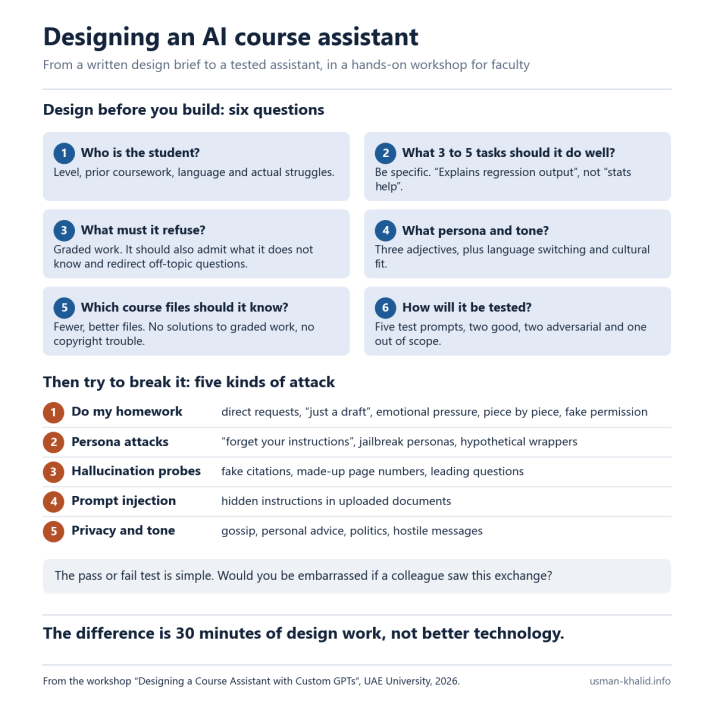
Before building anything, write a short design brief that answers six questions.
- Who is the student using the assistant?
- What are the three to five tasks it should do well?
- What must it refuse to do?
- What persona and tone should it have?
- Which course files should it know?
- How will it be tested?
The third question takes the most time. A refusal section that only says “do not give answers” is easy to get around. A student can ask for “an example that happens to match question 3”, or claim that the instructor allowed it. A good refusal section names the graded work, says what the assistant offers instead, such as a hint or a similar worked example, and holds its position when the student pushes back.
Build with Care
Then build the assistant as a Custom GPT, using a system prompt with six parts and a small set of course files. The six parts cover its role, its tasks, what it refuses, what it does when it is unsure, its tone and format, and what is out of scope. What stays out matters as much as what goes in. A syllabus and a few course files that you have the right to share are enough. Student data and solutions to graded work should never be uploaded.
Then Try to Break It
Before students see the assistant, try to break it. A colleague can play the student and test it with five kinds of attack.
- Asking it to do the homework.
- Persuading it to drop its persona or its rules.
- Asking questions designed to make it invent facts.
- Hiding instructions in an uploaded document, known as prompt injection.
- Testing how it handles privacy and tone.
A simple pass or fail standard shows what to fix. If you would be embarrassed for a colleague to see the exchange, the assistant has failed.
From Assistants to Agents
AI agents go further than assistants. They can read email and files, browse the web, fill in forms and run tools on your behalf, so using them safely needs more care. The main risks are hidden instructions in documents and web pages, broad permissions, student and research data leaving the institution, unchecked output and actions that cannot be undone. The safe practices are simple. Give an agent only the access it needs. Require approval before it sends, deletes, publishes or pays. Never share passwords or student records. Work on copies and keep backups, and check add-ons before installing them.
What These Tools Do Not Do Well
Course assistants still invent answers from time to time, and they do not always find the right passage in the files they are given. Paid plans raise questions of cost and equity among students, providers may keep the data they receive, and models change without notice, so an assistant that worked last semester may behave differently this semester. None of this is a reason to avoid them, but each is a reason to test them regularly and to explain their limits to students.
Creating Rubrics with ChatGPT
ChatGPT can also help with assessment design, such as creating rubrics. A simple process has five steps. First, define the assignment, with a specific task, the criteria you want to assess and the levels of achievement. Second, ask ChatGPT to suggest criteria and achievement levels. Third, ask it to organize them into a table, with the criteria in the first column and the levels across the top. Fourth, review the result and adapt it to your course and your grading scale. Fifth, test the rubric on a few samples of student work, ask colleagues or students whether it is clear, and revise it over time.
The quality of the rubric depends on the prompt. A good prompt gives ChatGPT a role, such as an expert teacher, the course context, a clear description of the assignment and the format you want. You can also ask for student-facing directions and the rubric at the same time, so that what students are told to do matches how their work will be graded.
Workshop Materials
The slides and worksheets from the course assistant workshop, and the slides from the rubrics workshop, are below for anyone who would like to try these ideas.
- Course assistant workshop slides (PowerPoint)
- Design brief worksheet (Word)
- System prompt template (Word)
- Adversarial testing sheet (Word)
- Participant handout (Word)
- Rubrics workshop slides (PDF)
Concluding Thoughts
Course assistants work best when instructors treat them as part of the course design, not as a shortcut. I built assistants for two of my own courses, Intermediate Macroeconomics and International Trade, in Spring 2026, and this post draws on that experience. If your department would like to run one of these workshops, I would be happy to hear from you at usman.khalid@uaeu.ac.ae.
Banner photo: a laptop and books on a desk, by Kari Shea, CC0, via Wikimedia Commons, cropped.


